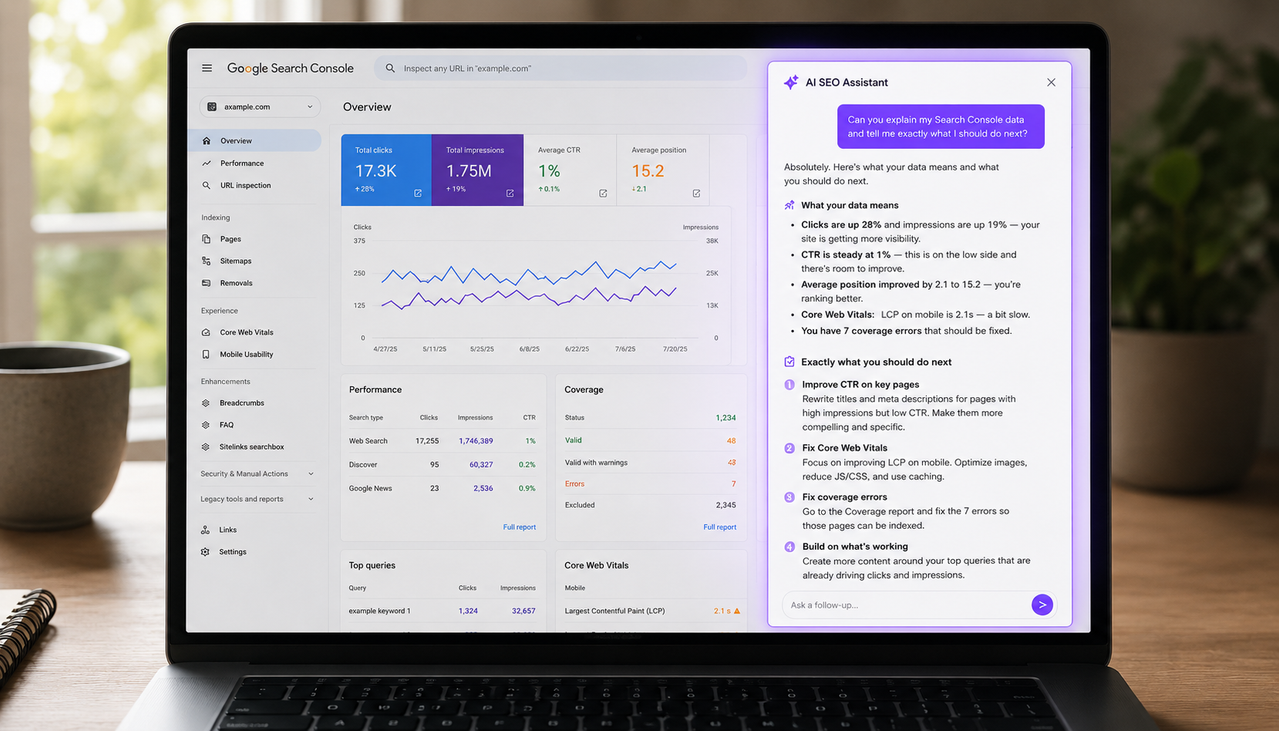
Google Search Console AI analysis is the practice of connecting your GSC data to an AI system that interprets it in plain language and tells you specifically what is happening, why it is happening, and what to do about it. Google Search Console shows you the numbers. AI analysis tells you what those numbers mean for your specific site. The difference between staring at a traffic drop in a chart and asking "why did my traffic drop this month?" and receiving a specific answer with the exact pages, keywords, and likely causes is the difference between data and decisions. In 2026, this capability is available to any founder willing to connect their search data to the right tools.
Key Takeaways
- According to ALM Corp's February 2026 Search Console guide, Google launched AI-powered configuration for Search Console in December 2025, allowing site owners to describe analysis in plain English and have the system automatically configure reports — eliminating the need to manually set filters, date ranges, and comparisons.
- According to PikaSEO's March 2026 guide, the most effective GSC AI workflow uses AI configuration for the 80 percent of routine checks — striking distance keywords, traffic drops, mobile performance — and manual filters for the 20 percent of complex custom analyses. AI handles speed, manual handles precision.
- According to Xpert Digital's April 2026 AI SEO analysis guide, combining GSC CSV exports with AI models like ChatGPT or Gemini allows you to find pages within striking distance at positions 11 to 20, identify CTR gaps, and generate prioritized action lists — saving the expense of costly third-party SEO tools entirely.
- According to Ryze AI's April 2026 research, connecting an AI agent to Google Search Console through the API eliminates manual data exports and enables real-time SEO analysis — with automated reporting saving 10 to 15 hours per week compared to manual GSC monitoring.
- According to RankWings' February 2026 GSC update guide, Google's February 2026 Discover core update means traffic changes in Discover are now visible separately in Search Console — making it critical to look at Discover metrics rather than assuming all performance changes are from traditional search.
What Google Search Console AI Analysis Actually Does
Google Search Console AI analysis turns raw search performance data into specific, actionable answers. It does this by connecting your GSC data — clicks, impressions, CTR, average position, keyword rankings, indexing status — to an AI system that can interpret patterns, compare periods, surface anomalies, and generate prioritized recommendations in plain language. You ask a question. The AI uses your actual site data to answer it specifically rather than giving you generic SEO advice that applies to everyone.
The capability exists at two levels in 2026. Google itself launched AI-powered configuration inside Search Console in December 2025 — you type a natural language request like "show me mobile clicks by country for the last 30 days" and the system configures the report automatically. According to ALM Corp's complete guide to the feature, this eliminates the manual filter setup that previously required navigating multiple menus for each analysis — a meaningful time saving for founders who check their data regularly but do not have the technical depth to configure complex reports from memory.
The second level is connecting your GSC data to external AI tools that go further than report configuration — they generate interpretations, recommendations, and prioritized action lists based on what the data actually shows. This is where the real leverage lives for founders who want to know not just what their data says but what to do about it. According to Xpert Digital's April 2026 analysis, combining GSC data with AI models allows you to systematically identify quick wins, prioritize by impact, and focus resources on the highest-value improvements — saving the expense of costly third-party SEO tools and replacing hours of manual analysis with minutes of conversation.
How to Use Google's Built-In AI Configuration in Search Console
Google's AI-powered configuration feature is live globally in the Performance report as of early 2026. To use it, open Google Search Console, go to the Performance report, and look for the natural language input at the top of the report. Type what you want to analyze in plain English and the system configures the filters, date ranges, and comparisons automatically.
The most useful natural language queries for this feature follow a consistent pattern: combine a metric, a dimension, and a time frame. "Show me queries with high impressions but low CTR in the last 90 days" surfaces your best opportunities for title tag optimization. "Compare mobile clicks this month to last month" diagnoses mobile-specific traffic changes without manual date range configuration. "Show me pages that lost the most clicks in the last 28 days" identifies your biggest ranking drops instantly. According to PikaSEO's practical guide, content teams use this to surface striking distance keywords at positions 8 to 20 with high impressions in under a minute — a task that previously required navigating multiple filter menus.
The current limitation is that Google's built-in AI configures existing data views — it does not generate recommendations or tell you what to do with the data it surfaces. You can ask it to show you pages with dropping CTR. You cannot ask it why CTR dropped or what to do about it. For those answers — the interpretation and action layer — you need to connect your GSC data to an external AI system that has both the data and the analytical capability to generate specific recommendations. Understanding how to read your Google Search Console data gives you the baseline knowledge to ask the right questions when you connect it to AI analysis tools.
How to Analyze Your GSC Data With AI Using the Export Method
The export method for Google Search Console AI analysis is free, requires no integrations, and produces surprisingly useful results for founders who cannot yet afford dedicated SEO platforms. Export your Search Console Performance report data to Google Sheets or CSV, then feed it to ChatGPT or another AI with a structured analysis prompt.
According to Xpert Digital's workflow guide, the effective sequence is: export a comparison report covering your target period versus the prior period including clicks, impressions, CTR, and average position for your top queries, then upload it to ChatGPT and ask specific diagnostic questions. "Which keywords lost the most impressions between these two periods?" "Which pages have high impressions but CTR below two percent?" "Which keywords are sitting between positions 8 and 20 that I should optimize first?" The AI processes the data and generates prioritized answers from your actual numbers in seconds.
The limitation of this method is that it is manual and periodic. You export data, upload it, ask questions, and get answers — but you have to repeat the process each time you want an update. For founders running a growing site, this becomes a time constraint. The alternative is connecting your GSC data directly through the API to an AI system that has permanent access to your live data and can answer questions at any time without requiring you to export and upload anything. According to Ryze AI's April 2026 connection guide, AI integration transforms Search Console from a reactive reporting tool into a proactive SEO monitoring system with 24 hour monitoring that catches issues within hours instead of weeks.
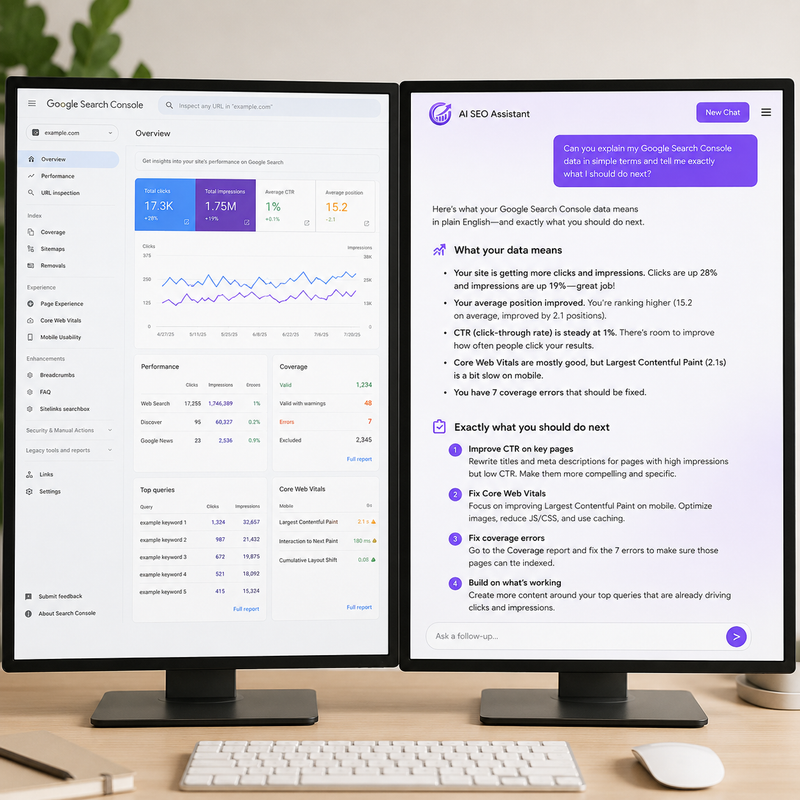
What AI Analysis Tells You That Search Console Cannot Tell You Alone
Google Search Console shows you status data — what your current rankings are, how many impressions you received, which pages are indexed. It does not tell you why those numbers are what they are or what you should do to change them. That interpretation layer is where AI analysis adds the most value for founders who are not professional SEOs.
When your traffic drops, Search Console shows you that it dropped and which pages were affected. AI analysis — connected to your real data — tells you whether the drop aligns with a Google algorithm update date, whether it is concentrated in mobile or desktop traffic, whether it affects specific keyword categories or is broadly distributed, and which specific pages lost the most position during the same period. That diagnostic specificity is the difference between knowing something happened and knowing what to do about it.
According to ALM Corp's 2026 Search Console complete guide, as of 2026 Google Search Console integrates AI Overview and AI Mode data into the standard Performance report alongside traditional search results. When your content appears in an AI Overview, you see impressions counted when the result is scrolled into or expanded, and clicks counted when users click through from the AI-generated summary. Queries where you rank positions 1 to 3 but have unusually low CTR now often indicate AI Overviews are answering those queries without clicks — a pattern AI analysis can identify automatically by comparing your position-to-CTR ratio against expected benchmarks.
SEO chat tools connected to your real Search Console data answer questions traditional GSC cannot. "What should I focus on this week to improve my organic traffic?" "Which of my competitors is outranking me for keywords I am close to winning?" "Why did impressions go up while clicks went down?" "Which pages on my site are closest to reaching page one?" These questions require both your data and the analytical capability to interpret it. Platforms that combine live GSC data access with AI-powered analysis give you an SEO consultation available any time you have a question, at a fraction of the cost of a monthly retainer with an agency. Scalemee connects directly to your Google Search Console and combines that data with competitor intelligence to answer exactly these questions — telling you which keywords to target, which pages to improve, and why your traffic is performing the way it is, based on your actual numbers rather than generic SEO advice.
The Specific GSC Questions AI Analysis Answers Best
AI analysis of Google Search Console data produces the highest-quality answers for five categories of questions. Each of these requires synthesizing multiple data points from your GSC export into a single prioritized recommendation — the task that is most time-consuming to do manually and most efficiently handled by AI.
Traffic drop diagnosis is the first category. "Why did my organic traffic drop between March and April?" requires comparing keyword positions across two periods, identifying which pages lost the most clicks, cross-referencing the dates against known algorithm update schedules, and checking whether the drop is device-specific or query-type specific. An AI with access to your data produces this analysis in seconds. Without AI, the same diagnosis takes an experienced SEO analyst 45 minutes to an hour.
Striking distance opportunity identification is the second. Keywords ranking between positions 8 and 20 are validated by Google as relevant to your site and need only targeted content improvements to reach page one. Finding them manually requires filtering Search Console by position range, sorting by impressions, and cross-referencing with keyword difficulty data. According to PikaSEO's usage analysis, Google's own AI configuration now surfaces these striking distance opportunities from a single natural language prompt — making this the most immediately useful application of AI for Search Console analysis.
CTR gap analysis is the third. Pages with high impressions but low CTR are your best opportunities for title tag and meta description optimization — you are already appearing in search results, you just need more people to click. AI analysis identifies these pages automatically and can suggest specific title tag improvements based on the queries triggering those impressions. Understanding how to rank on Google without an SEO agency covers the content optimization strategy that follows from these AI-identified opportunities.
How AI Analysis of GSC Data Compares to Traditional SEO Tools
Traditional SEO tools like Semrush and Ahrefs charge $108 to $400 per month for access to keyword databases, competitor research, and rank tracking. They show you industry-wide data with your site overlaid on top. AI analysis of your GSC data starts from your site specifically and generates insights from your actual performance rather than from modeled estimates. The two approaches answer different questions.
Traditional tools answer questions about the broader keyword landscape — how competitive a keyword is, how many sites rank for it, what the estimated traffic potential is. GSC AI analysis answers questions about your specific site — which keywords you already rank for, which are closest to page one, why your traffic changed, and what specific pages need attention. According to Xpert Digital's comparative analysis, the quality of questions you ask your own data determines the quality of your SEO decisions far more than the sophistication of third-party tools in 2026.
The most effective workflow combines both approaches: use GSC AI analysis to identify your specific priorities from your actual data, then use third-party tools for broader competitive research when those priorities require understanding the competitive landscape. For early-stage sites with limited budgets, starting entirely with GSC AI analysis — free data plus a low-cost AI tool — produces actionable results before adding the cost of traditional SEO platforms. Understanding how GEO and traditional SEO work together in 2026 gives you the strategic context for which data sources to prioritize as your site grows.
Frequently Asked Questions About Google Search Console AI Analysis
What is Google Search Console AI analysis and how does it work?
Google Search Console AI analysis is the practice of connecting your GSC search performance data to an AI system that interprets it in plain language and generates specific recommendations. It works at two levels: Google's own built-in AI-powered configuration, which automatically sets up reports from natural language descriptions, and external AI tools connected to your GSC data that generate interpretations and action lists. The built-in feature handles report setup. External AI tools handle the analysis and recommendation layer that tells you what to do with the data.
How do I use AI to analyze my Google Search Console data for free?
Export your Performance report data from Search Console as a CSV or Google Sheets file. Upload it to ChatGPT with a specific analysis prompt: "Analyze this Search Console data and identify my top 10 striking distance keywords, my biggest CTR gaps, and the three pages that lost the most clicks compared to the previous period." ChatGPT processes the data and generates a prioritized analysis from your actual numbers at no cost beyond your ChatGPT subscription. This export method requires no integrations and works immediately with any GSC account.
What questions can AI answer from my Google Search Console data?
AI analysis of GSC data answers five question categories most effectively: why your traffic dropped and which pages caused it, which keywords are closest to page one and worth optimizing now, which pages have high impressions but low CTR indicating title tag problems, whether a traffic change is mobile-specific or affects all devices, and which query types are gaining or losing visibility over time. These questions require synthesizing multiple data points and comparing periods — tasks that take experienced SEOs 30 to 60 minutes manually and AI seconds when connected to your real data.
Does Google Search Console have AI built in now?
Yes. Google launched AI-powered configuration inside the Performance report in December 2025, with broader availability in January 2026. The feature accepts natural language descriptions of the analysis you want and automatically configures the appropriate filters, date ranges, and comparisons. You can type "show me queries with high impressions but low CTR in the last 90 days" and the report configures instantly. The current limitation is that it configures data views — it does not interpret the data or generate recommendations about what to do with it.
How is AI SEO analysis different from using Semrush or Ahrefs?
Traditional SEO tools show you industry-wide keyword data with your site overlaid on top — you see how competitive keywords are and how many sites rank for them. AI analysis of your GSC data starts from your specific site and generates insights from your actual performance. Semrush answers questions about the broader keyword landscape. GSC AI analysis answers questions about your specific pages, your specific rankings, and your specific traffic patterns. The most effective approach combines both: use GSC AI analysis for site-specific priorities, then use traditional tools for broader competitive research when needed.
Can AI analysis of Search Console data replace an SEO agency?
For most early-stage founders, AI analysis of GSC data replaces the diagnostic and prioritization functions of an SEO agency at a fraction of the cost. An SEO agency typically charges $1,500 to $5,000 per month. AI tools connected to your real GSC data cost $30 to $200 per month and are available 24 hours a day rather than during business hours. The functions agencies provide that AI cannot replicate are relationship-based link building, creative strategy development, and accountable project management. For data analysis, keyword prioritization, and content recommendations, AI connected to real data produces comparable quality at dramatically lower cost.
How often should I run AI analysis on my Google Search Console data?
Weekly analysis of your Performance report catches traffic drops, CTR changes, and indexing issues before they compound into larger problems. Monthly analysis of striking distance keywords identifies optimization opportunities and tracks whether previous optimizations produced ranking improvements. Immediate analysis whenever you notice an unexpected traffic change, publish a significant content update, or suspect an algorithm update has affected your rankings. According to Ryze AI's 2026 research, AI integration with real-time GSC access catches issues within hours compared to weeks for manual monitoring — making continuous connection more valuable than periodic export-based analysis as your site grows.
What is the best way to connect AI to Google Search Console for ongoing analysis?
Three connection methods exist in 2026. Google's built-in AI configuration is the simplest — no setup required, works in your existing Search Console account, handles routine report configuration. The export method — downloading CSVs and uploading to ChatGPT — is free and effective for periodic analysis without technical setup. Direct API integration through platforms built on the Search Console API provides continuous real-time access without manual exports — the most powerful approach for founders who want on-demand answers at any time. The right method depends on how frequently you need analysis and your tolerance for manual data handling.
Google Search Console AI analysis closes the gap between knowing your SEO numbers and knowing what to do about them. The data has always been in Search Console. The interpretation layer is what most founders have been missing. Start this week with Google's built-in AI configuration in your Performance report — type your three most pressing questions in plain language and see what the system surfaces. Then export your last 90 days of data to ChatGPT and ask for your top striking distance keywords and biggest CTR gaps. The combination of those two free approaches gives you more actionable SEO direction than most founders have ever had access to without an agency or an expensive tool subscription.

.jpg)