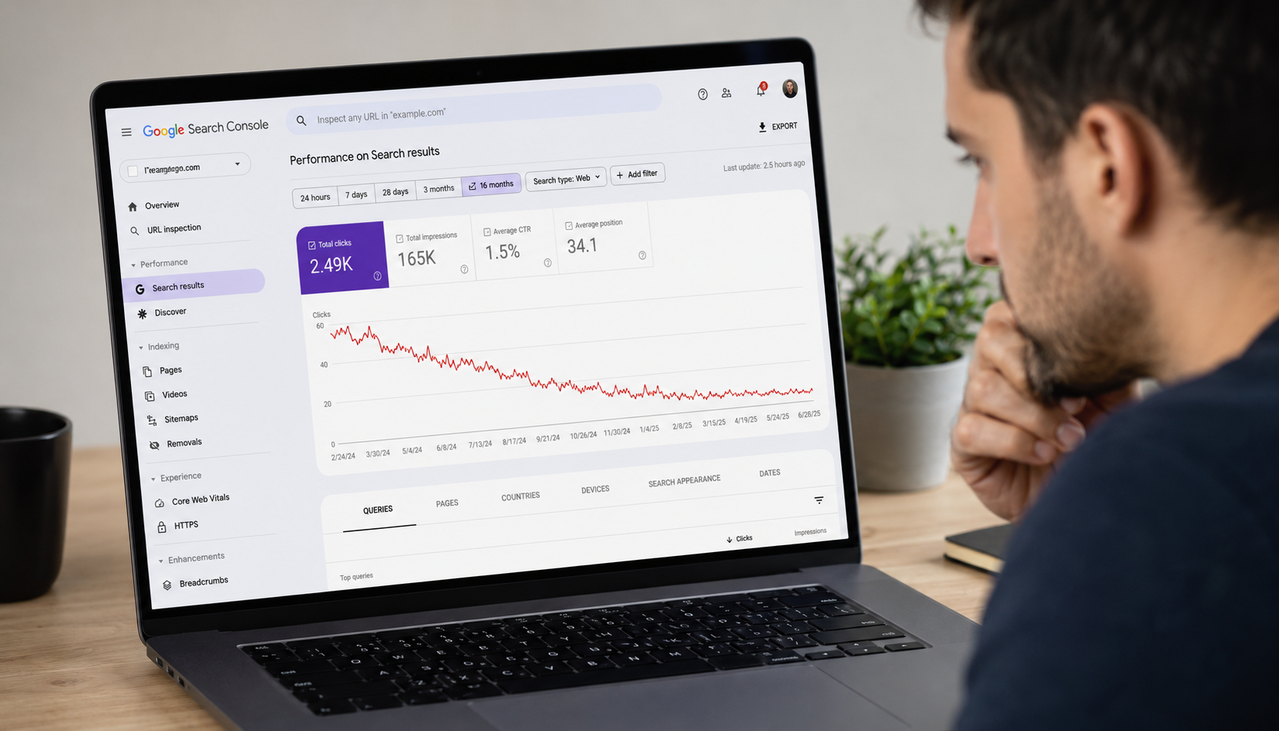
Finding pages losing traffic in Google Search Console takes five minutes when you know where to look. Go to the Performance report, click the Pages tab, set a comparison date range covering the period before and after your traffic drop, and sort by the biggest decline in clicks. The pages at the top of that list are your highest-impact casualties. What you do with that list — how you diagnose each page and decide what to fix — is where most founders get stuck. This guide walks through the exact process from finding the pages to diagnosing the cause and taking the right action for each situation.
Key Takeaways
- According to Google's official Search Console troubleshooting guide, the first step when diagnosing any traffic drop is determining whether it affects one page, a few pages, or is site-wide — because each pattern points to a completely different root cause requiring a different fix.
- According to Velacore's 2026 AI traffic analysis, pages with increasing impressions but falling clicks are the most important to prioritize — the demand is still there, but Google AI Overviews are intercepting the clicks. These pages have the highest upside from optimization because they are already visible in search.
- According to Search Engine Land's GSC diagnostic guide, the Search Appearance report inside Search Console is underutilized — it shows whether specific SERP features like AI Overviews and Featured Snippets are affecting your listings, which standard Performance report analysis misses entirely.
- According to Google's Search Central debugging documentation, a large drop in position — falling from the top 10 to position 29 or lower across a wide range of terms — requires a whole-site quality self-assessment rather than page-by-page fixes, because this pattern indicates a broad algorithmic signal shift rather than individual page problems.
- According to Velacore's 2026 data, informational queries now trigger AI Overviews 40 to 50 percent of the time compared to just 4 percent for transactional queries — meaning blog content and guides are experiencing structurally different traffic patterns than product and service pages in 2026.
The Exact Steps to Find Your Pages Losing Traffic in Google Search Console
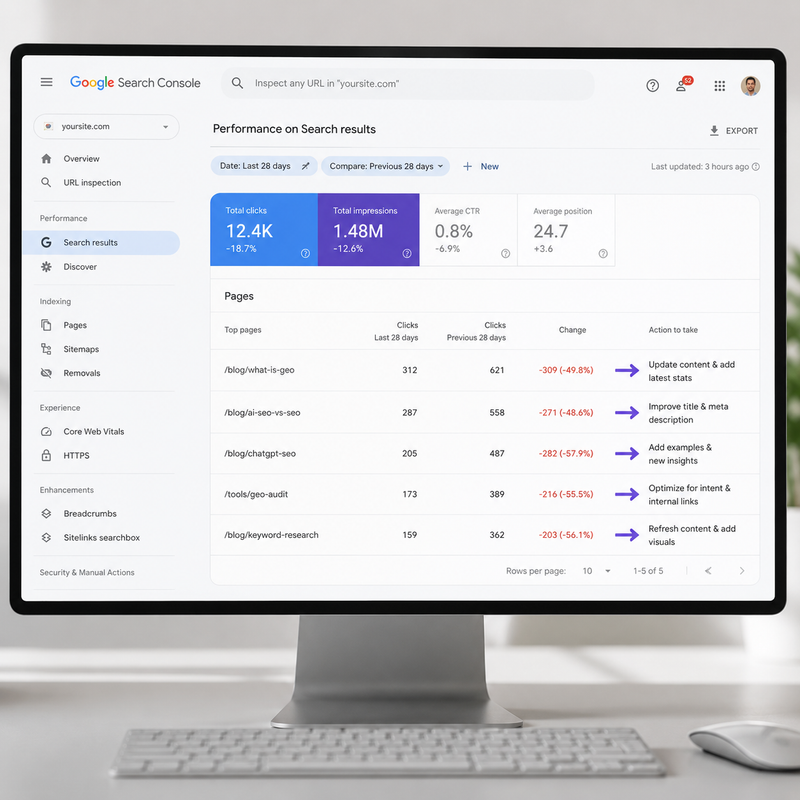
Finding your declining pages in Google Search Console follows a consistent four-step process. Open Search Console and go to the Performance report. Click the Pages tab at the top of the data table — this switches the view from queries to individual URLs. Click the date filter and select Compare, then choose a meaningful comparison period. The most useful comparisons are the last 28 days versus the previous 28 days for recent drops, or the last 3 months versus the same 3 months one year ago for longer-term trend analysis. Sort the table by Clicks Difference — lowest first. The pages showing the largest negative click difference are your highest-priority investigation targets.
According to Google's official traffic drop troubleshooting guide, once you have identified the drop period, restrict your date filter to that exact timeframe and compare it against the immediately preceding identical timeframe. This scopes your data precisely to the period something changed rather than showing you longer-term averages that smooth out the drop. The resulting comparison table shows you exactly which pages lost clicks, how many impressions they still generate, and whether the drop came from position changes or CTR changes — three different problems with three different solutions.
For each declining page, note three data points before moving to diagnosis: how many clicks it lost in absolute terms, whether impressions also dropped or stayed flat, and whether average position changed significantly. These three signals point you toward the correct cause category before you spend time investigating further. Impressions and clicks both dropping together points toward ranking loss. Impressions staying flat or growing while clicks drop points toward CTR erosion, which in 2026 most commonly means AI Overviews are intercepting your traffic before anyone clicks through to your page.
How to Diagnose Why Each Page Lost Traffic
Diagnosing why a specific page lost traffic requires matching the pattern of what changed against the most common causes. There are five distinct traffic drop patterns in Google Search Console, each pointing to a different root cause and requiring a different response.
Pattern one is clicks and impressions both dropped at the same time. This indicates a ranking loss — Google moved your page down in search results and fewer people are seeing it. Check whether the drop date aligns with a known Google algorithm update by comparing your timeline against Google's Search status dashboard. If the dates match, a core update changed how Google evaluates your content category. According to Google's Search Central debugging documentation, algorithm-related drops require improving overall content quality and helpfulness — not individual technical fixes — and recovery typically requires waiting for the next core update cycle.
Pattern two is impressions stayed flat or grew while clicks dropped significantly. This is the most common pattern in 2026 and it almost always means AI Overviews are answering the query before users click through to your page. According to Velacore's 2026 AI Overview traffic analysis, for queries with an AI Overview present the zero-click rate hits 80 to 83 percent. The solution is not to recover clicks from the traditional search result — it is to get your page cited inside the AI Overview so your brand appears in the answer even when users do not click. Understanding how to get featured in Google AI Overviews covers the exact structural changes that shift your page from invisible to cited in those AI-generated answers.
Pattern three is a sudden drop affecting only one or two specific pages with no broader site-wide impact. This points to a page-specific technical issue. Use the URL Inspection tool in Search Console to check whether Google can access and index those specific pages. Look for accidentally added noindex tags, canonical tag problems, or robots.txt blocks that were introduced around the time the drop started. According to Google's official guidance, these technical causes produce a distinctive drop pattern — fast onset, affecting a specific subset of pages, with no corresponding impression change on the rest of the site.
Pattern four is a site-wide drop where most pages are equally affected regardless of topic or type. This signals an infrastructure problem — your site experienced downtime Google detected, a security issue was flagged, or a manual action was issued. Check the Security Issues report and Manual Actions report in Search Console immediately. A manual action produces a persistent, hard-to-recover drop that does not improve until you resolve the violation and submit a reconsideration request.
Pattern five is a gradual, slow decline over weeks or months without a clear sudden drop date. This typically indicates content quality erosion — competitors have published better content on the same topics, or your content has become dated relative to what currently ranks. The fix is a content refresh that adds current data, more specific examples, and better answer-first structure to the declining pages rather than publishing entirely new content.
How to Use the Comparison Report to Find Your Biggest Losers Fast
The comparison report in Google Search Console is the fastest way to surface your highest-impact declining pages without manually reviewing each URL. Set your comparison period, click the Pages tab, enable all four metrics — Clicks, Impressions, CTR, and Position — and sort by Clicks Difference ascending. The pages with the largest negative values at the top of the list are where you start.
According to Velacore's 2026 traffic methodology, for each page in your top 10 loss list note the impressions it is still generating, the CTR now versus the comparison period, and what type of content it is. Informational pages — how-to guides, FAQs, explainers, definitions — are experiencing 30 to 40 percent organic traffic declines as AI Overviews handle these query types most aggressively. Transactional pages targeting buyers ready to purchase are far less exposed. If your traffic losses are concentrated in your blog and resource content, AI Overviews are almost certainly the cause. If losses are spread across both informational and transactional pages equally, a broader algorithmic or technical issue is more likely.
The Search Appearance report is a valuable complement to the Pages comparison that most founders never open. According to Search Engine Land's underutilized GSC reports guide, this report shows whether specific SERP features are affecting your listings — whether AI Overviews, Featured Snippets, or other search features are appearing for your queries and changing the click dynamic. A page that previously drove strong CTR from position 3 might now show lower CTR not because it moved down but because a Featured Snippet or AI Overview now sits above it, reducing the proportion of users who scroll down to your result.
The Crawl Stats report — found under Settings in Search Console — is another underutilized diagnostic tool for understanding traffic drops. It shows how many pages Google crawled over time, download times, and crawl response codes. A sudden drop in pages crawled often indicates a technical barrier Google encountered — server overload, robots.txt misconfiguration, or a deployment that introduced new crawl errors. Checking Crawl Stats alongside your Performance comparison gives you both the traffic impact and the potential crawl cause in the same diagnostic session.
What to Do With Each Declining Page After You Find It
Once you have identified your declining pages and matched each one to a cause pattern, the action for each category is specific. Ranking drops from algorithm updates require a content quality audit — assess whether the page is genuinely the most helpful, specific, and expertise-demonstrating answer available for its target query, and improve it if not. Do not make technical changes hoping to recover from a content quality update. According to Google's documentation, recovery requires demonstrating sustained content improvement and typically becomes visible only after the next core update evaluates your site again.
Pages with flat impressions but dropping CTR need their title tags and meta descriptions rewritten rather than their content improved. The page is still appearing in search results — users are just not choosing to click it. Open the page in Search Console, look at the queries driving its impressions, and rewrite the title tag to more directly address the specific intent those queries represent. A title that matches the exact question a user is asking converts significantly better than a title that describes what the page covers generally.
Pages experiencing AI Overview interception — impressions up, clicks down, ranking stable — need to be restructured for AI citation rather than optimized for traditional click recovery. Add an answer capsule to the opening of each section, implement FAQPage schema markup, and cite named sources throughout the content. The goal shifts from getting the click to getting cited inside the AI answer, which produces brand visibility even when users never visit your page. Understanding how to write content that shows up on ChatGPT gives you the structural framework that applies equally to Google AI Overview citation.
For founders who want to skip the manual diagnosis process entirely, AI tools connected to your real Search Console data answer these questions directly. Scalemee's AskScalemee feature connects to your live GSC data and answers questions like "which of my pages lost the most traffic this month and why?" with specific answers based on your actual numbers — identifying whether each drop came from ranking loss, CTR erosion, or AI Overview interception without requiring you to run the comparison report, match patterns, and cross-reference update dates manually. It functions as an SEO consultant available any time you need a diagnosis, at a fraction of the cost of hiring one.
How to Prioritize Which Declining Pages to Fix First
Not every declining page deserves equal attention. Prioritizing by the combination of traffic lost and realistic recovery potential produces better results than working through your loss list in order. Three factors determine where to start: how much traffic the page lost in absolute terms, whether the cause is fixable with your current resources, and how quickly a fix is likely to produce results.
Pages that lost significant traffic due to CTR erosion from AI Overviews are often the highest-priority targets because the fix is structural rather than competitive. You are not trying to outrank anyone — you are restructuring content to get cited in the AI answer that is already appearing above your result. The competitive bar for AI Overview citation is lower than the competitive bar for position 1 ranking, making these pages faster wins with higher upside than pages that lost rankings to stronger competitors.
Pages that dropped due to technical issues — noindex tags, canonicalization problems, robots.txt blocks — are the second highest priority because the fix is often a single change that restores full traffic immediately. A page blocked from indexing that previously drove 500 clicks per month can recover most of that traffic within one to two weeks of the block being removed and the page being re-crawled. According to Digital Upward's March 2026 indexing guide, indexing problems that are not addressed immediately turn into compounding problems that become harder and more expensive to fix the longer they persist.
Pages that declined due to broad algorithmic quality signals are the lowest immediate priority for most founders because recovery requires sustained content improvement over weeks or months and is not guaranteed. Start with the technical and CTR fixes, which produce results faster and more predictably, before investing significant time in algorithmic recovery work. Understanding how to read your Google Search Console data gives you the foundational knowledge to run this prioritization analysis accurately every time you check your site's performance.
Frequently Asked Questions About Finding Pages Losing Traffic in Google Search Console
How do I find which pages lost traffic in Google Search Console?
Go to the Performance report in Google Search Console. Click the Pages tab at the top of the data table. Click the date filter, select Compare, and choose a comparison period — the last 28 days versus the previous 28 days works well for recent drops. Enable all four metrics: Clicks, Impressions, CTR, and Position. Sort the table by Clicks Difference with the lowest values first. The pages showing the largest negative click difference are your highest-priority investigation targets. This entire process takes under five minutes and uses only free tools built into Search Console.
Why are my pages losing traffic even though their rankings have not changed?
Stable rankings with dropping clicks almost always indicates AI Overview interception in 2026. According to Velacore's analysis, for queries with an AI Overview present the zero-click rate hits 80 to 83 percent. Your page is still ranking at position 3, but an AI-generated summary now sits above your result and answers the query for most users before they scroll down to click anything. The fix is not to recover rankings — it is to get your page cited inside the AI Overview, which means restructuring your content to lead with direct answers and implementing FAQPage schema markup.
How do I know if a Google algorithm update caused my traffic drop?
Compare the date your traffic drop started against Google's published algorithm update history on the Search status dashboard at developers.google.com/search/updates/ranking. If your drop began within the same week as a confirmed core update, the cause is almost certainly algorithmic. Algorithm-related drops show a consistent pattern: multiple pages across different topics declined simultaneously, the drop was relatively sudden rather than gradual, and impression changes broadly match click changes. Recovery requires improving content quality across your whole site and typically becomes visible only after Google's next core update re-evaluates your domain.
What is the difference between a page losing impressions versus a page losing clicks?
Impressions dropping means Google is showing your page less often in search results — your ranking declined or Google stopped indexing the page. Clicks dropping while impressions stay stable means your page is still appearing in results but fewer users are choosing to click it — a CTR problem caused by AI Overviews intercepting clicks, a title tag that does not match search intent, or competing results that became more compelling. Each pattern requires a different fix. Ranking drops need content improvement. CTR drops need title and meta description rewrites or AI Overview optimization. Combining both metrics in your analysis prevents you from applying the wrong solution to the right problem.
How often should I check for pages losing traffic in Google Search Console?
Weekly comparison checks for your top 20 pages by traffic catch problems before they compound significantly. Monthly site-wide comparison analysis identifies broader trends — pages that are slowly declining rather than dropping sharply — and surfaces optimization opportunities across your full content library. Check immediately after any significant site changes — new deployments, content updates, structural changes — to confirm the changes did not accidentally introduce technical issues that affected indexing or crawlability. The 2 to 3 day data delay in Search Console means checking daily is not useful, but weekly checks give you enough data freshness to catch most problems within a week of them starting.
Can I use AI to diagnose which pages are losing traffic in Google Search Console?
Yes. The most efficient method is exporting your Performance comparison report as a CSV and uploading it to ChatGPT with a specific analysis prompt: analyze this Search Console comparison data and identify the top 10 pages that lost the most clicks, categorize each drop as ranking loss, CTR erosion, or both, and suggest the most likely cause for each based on the impression and position data. ChatGPT processes the data and generates a prioritized diagnosis in seconds. For founders who want continuous real-time analysis without manual exports, SEO tools connected directly to your Search Console API provide on-demand answers to traffic drop questions using your live data.
What should I do if my entire site lost traffic at the same time?
A simultaneous site-wide drop across most pages points to one of three causes: a Google core algorithm update, a technical infrastructure issue affecting how Google accesses your site, or a manual action penalty. Check the Manual Actions report in Search Console first — a manual action produces a clear notification. Then check the Security Issues report for any flagged problems. If neither shows anything, compare your drop date to Google's algorithm update history. For algorithm-related site-wide drops, the response is a full content quality audit — assessing whether your site overall meets Google's helpfulness and expertise standards — rather than fixing individual pages.
How long does it take to recover traffic after fixing a declining page?
Recovery timelines vary significantly by cause. Technical fixes — removing an accidental noindex tag, fixing a canonicalization error — produce visible traffic recovery within one to three weeks once Google recrawls the affected pages. CTR improvements from rewriting title tags typically show measurable impact within two to four weeks. Content quality improvements for ranking drops take longer — Google evaluates content quality over time and recovery from algorithm-related drops typically requires waiting for the next core update cycle, which can be months. Request re-indexing through the URL Inspection tool after making any significant changes to accelerate the crawl rather than waiting for Googlebot to discover the updates on its own schedule.
Finding pages losing traffic in Google Search Console is a five-minute process when you follow the right steps — Performance report, Pages tab, comparison date filter, sort by clicks lost. What takes longer is diagnosing why each page dropped and choosing the right fix for each cause pattern. The distinction between ranking drops, CTR erosion from AI Overviews, and technical issues determines whether you need to improve content quality, restructure for AI citation, or fix a crawl problem — and applying the wrong fix wastes weeks of effort. Run the comparison report this week, identify your top five declining pages, match each one to a cause pattern, and start with the pages showing flat impressions and dropping clicks — those have the fastest recovery path and the highest upside from AI Overview optimization in 2026.